

A service calculator can start as “just a form” and turn into a small business application. How do you decide between native Sitecore forms, custom development and a configurable solution such as RozetIQ, and who maintains the calculation when the rules change?
“It’s just a form, right?”
A few inputs, a dropdown and a submit button. Then the requirements arrive.
The questions depend on previous answers. The result needs a calculation. That calculation already exists in Excel, maintained by someone in the business. Visitors should see an estimate immediately, and sales needs enough context to follow up.
The visible interface is still a form. Behind it, the team is designing a business application.

For Sitecore developers and technology leaders, the challenge is deciding where that application’s responsibilities should sit and how much of it the team wants to build and maintain.
Follow one example: a service cost calculator
Imagine a company offering a service whose price depends on expected usage and the level of support.
Today, a salesperson collects the details, enters them into a workbook and emails an estimate. The process works, but every request requires manual input. Customers wait even when their requirements are straightforward.
The company wants an indicative calculator on its Sitecore website.
The visitor provides:
- the service they need;
- expected monthly usage;
- the number of locations;
- their preferred support level.
Those answers determine the next questions. A service available at one location might need fewer inputs than a service spanning several sites. Some combinations require individual review.
The calculation applies the relevant rates and thresholds. The result shows an estimated monthly cost, explains the assumptions and identifies anything that needs confirmation.
An illustrative result might read:
The visitor gets a useful indication, while sales receives a starting point for the next conversation. The estimate’s assumptions are visible before anyone treats it as a confirmed quote.
If the visitor wants to continue, the proposed sales handoff would include their inputs and estimate. How that information reaches sales is a separate integration decision.
This is one interaction, but it contains several distinct concerns: presentation, conditional questions, calculation, validation and downstream handling.
Choosing the right implementation starts by separating them.
Native Sitecore forms, custom development or RozetIQ?
The existence of conditional questions does not automatically justify adding another platform. Start with the capabilities available in your particular Sitecore product and version.
Use Sitecore’s built-in forms capabilities when they cover the interaction
For an enquiry, registration or questionnaire, Sitecore’s built-in forms capabilities (including Sitecore Forms, depending on your product and version) may already provide what you need.
Conditional visibility alone is not a reason to introduce another platform.
The decision changes when the form needs to use an external calculation model, preserve Excel-based business logic or support several calculators with similar behaviour. Native forms may still be part of the solution, but the calculation and its maintenance become additional implementation responsibilities.
Before extending the form, decide where those responsibilities should sit.
Choose custom development when the experience needs it
A custom component or application gives the team control over the interface, calculation services and integrations.
That can be the right investment when the interaction is central to the product, requires highly specific behaviour or needs close coordination with existing backend systems.
It also means owning the implementation over time. A rate change, new calculation branch or additional service option may require changes to code, tests and deployment.
That ownership can be entirely appropriate. It should be an explicit decision.
Consider RozetIQ when configurable forms meet business calculations
RozetIQ is relevant when a guided interaction needs to collect inputs, apply defined business rules and present a calculated result or recommendation.
It is particularly worth exploring when the team expects to maintain several calculators or assessments with similar interaction patterns.
The decision is about where configuration can replace repeated implementation work and where custom development is still needed.
For our service calculator, the key question becomes: which parts of the interaction and calculation can be configured, and which require a dedicated implementation?
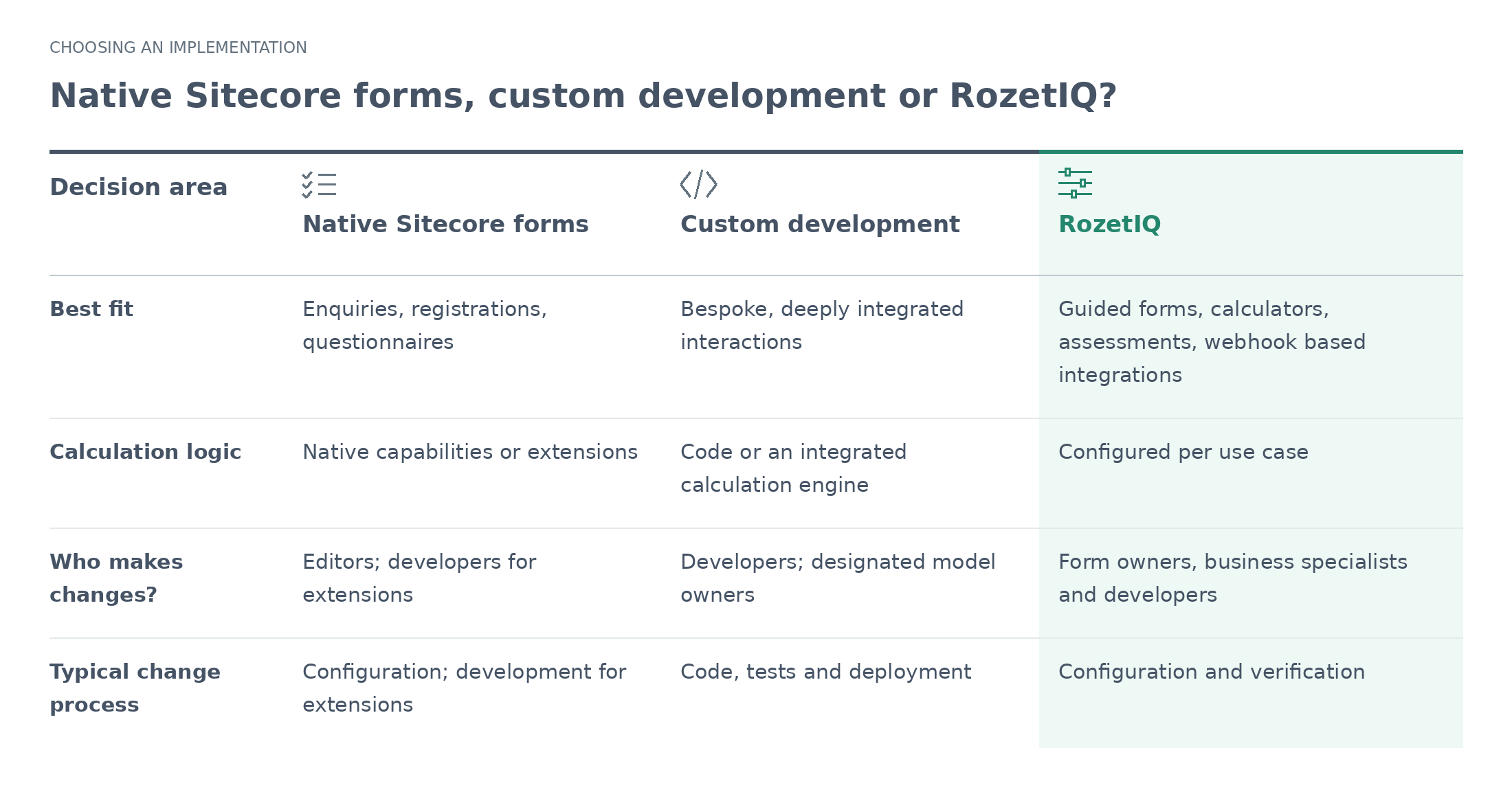
The useful comparison is the work your team will own over time: maintaining the interaction, the calculation and the connection between them.
The Excel model may already contain the hard work
A pricing workbook can represent years of accumulated business knowledge.
Its formulas capture thresholds, exceptions and dependencies that may never have been written into a separate specification. Reimplementing them requires more than translating a few formulas.

Developers need to understand the model, reproduce its behaviour and verify that both implementations agree. If the workbook remains in use afterwards, the organisation also needs to keep the two versions aligned.
Before choosing an implementation, establish which parts of the workbook represent business rules, which inputs the visitor needs to provide and which outputs the website should present.
Whether the existing model can be retained behind a web interface depends on the workbook and the implementation approach. ALLWIN can assess this for your model.
For the service calculator, the visitor needs straightforward questions about usage and support level, followed by an understandable estimate. How the underlying calculation is implemented should be a deliberate technical decision.
How RozetIQ connects to Sitecore
RozetIQ separates form configuration from the surrounding website.
Your team requests a RozetIQ space from ALLWIN. ALLWIN provisions access and supplies the connection details. The Sitecore Marketplace Connector is then installed and configured to connect the Sitecore environment to that space.
The Connector can be installed before access is supplied, but the connection details are needed before it can be used.
Once connected, the team can explore the example forms, configure a form for its own use case and select it for the Sitecore experience.
The examples provide a starting point. A production service calculator still needs its own questions, rules, result presentation and integration decisions.
To show the forms in the website the website developer team has to implement a new component, using the npm client library.
Give each change a clear owner
Returning to our calculator, consider three requests:
“Change the introduction above the calculator.”
“Ask an additional question for multi-location customers.”
“Update the rate used for premium support.”

These changes belong to different parts of the solution.
- Website content and placement belong to the Sitecore.
- Questions, conditional steps and result presentation belong to the form definition.
- Rates, thresholds and calculation rules belong to the Excel file behind the form.
One person may cover several responsibilities, but the boundaries should still be clear. They determine who can make a change, who reviews it and what needs to be verified before release.
The team also needs to agree which version of the calculation is approved for use and how changes reach the live experience.
Test the result and the handoff together
A calculator is useful only if users can trust what happens after they enter their details.
For the service estimate, agree on representative inputs and expected outputs with the model’s owner. Include values around pricing thresholds, unsupported combinations and incomplete answers.
Then follow the whole interaction:
- Does changing an earlier answer update the relevant questions and result?
- Are assumptions and exclusions visible beside the estimate?
- What happens when a calculation cannot be completed?
- If the visitor continues, does sales receive the correct context?
- Can the team establish which rules produced a result when investigating a problem?
An indicative estimate should also be clearly distinguished from a confirmed quote. That distinction affects both the wording and the downstream process.
These checks apply whether the implementation uses native forms, custom code or RozetIQ. Configuration changes can alter business outcomes just as code changes can.
Start with one calculator you can verify
A useful first project has a defined audience, identifiable inputs and an outcome that a business owner can check.
Our service calculator is a good example: one interaction, one calculation model and a clear next step for the visitor.
Start there. Confirm the model, define ownership and test the complete experience before expanding into more services or assessments.
That gives the team a practical basis for deciding which parts to configure and which parts to build, and a repeatable approach for the next “simple form”.
Try RozetIQ with your own use case
RozetIQ beta access is free until January 2027. Pricing for continued use after the beta is agreed individually with ALLWIN.
Bring a calculator, guided assessment or existing Excel model that your team wants to make available through Sitecore. Explore the example forms and discuss the implementation requirements with us.


