

• We migrated a production Umbraco 8 system to Umbraco 17 (LTS) and moved the codebase from .NET Framework to .NET 10, with a hard constraint: the change had to be invisible to the PWA client consuming its API.
• The database required no custom tooling. We chained empty Umbraco 10 and 13 solutions purely as upgrade steps and let Umbraco's own migration engine do the work. No uSync Migration was needed.
• The codebase had to be rewritten - and this is where AI (Cursor) earned its place. Faithful, high-volume translation between frameworks is close to an ideal AI task.
• The decisive factor was not prompt quality. It was moving architectural decisions out of the chat window and into the repository as persistent rules (always-on constraints) and skills (recipes for recurring tasks).
• The payoff: consistency across developers and sessions, method-level traceability back to the legacy source, controlled scope, and explicit human decisions at every ambiguous point.
Legacy migration is one of the highest-risk pieces of work a development team can take on. The code works. It has served users for years. But the framework underneath it has aged out of support, and technical debt compounds every month.
We recently took on exactly this: an Umbraco 8 system serving a progressive web app (PWA) through a Web API, where application users were also Umbraco members with their own content and data. The target was Umbraco 17 - the current long-term-support release - plus the move from .NET Framework to .NET 10.
The governing constraint was compatibility, not modernization. The client's expectation was that the upgrade produce no observable change from the PWA's perspective: no mobile app changes, no new client release, no content or member data drift. Modernization mattered - it was the reason for the project - but deliberately with minimal refactoring. Large-scale reorganization performed during a migration tends to escape its boundaries and create more problems than it solves.
Eight to seventeen is a long jump, and Umbraco stores content, configuration and member data in the database.
In previous Umbraco 8→13 upgrades we always needed uSync Migration, because breaking changes in the data structure meant certain Umbraco 8 field types no longer existed in later versions and had to be converted without data loss - a manual, verification-heavy process. This project's content structure didn't require it.
So we built a chain of stepping stones:
1. Update the existing database to the latest Umbraco 8 release.
2. Point an empty Umbraco 10 solution at that database and let Umbraco upgrade it.
3. Point an empty Umbraco 13 solution at the result and repeat.
4. Arrive at the target.
Those intermediate solutions contained no business logic whatsoever. They existed solely to let Umbraco's built-in upgrade mechanism walk the schema forward step by step.
.png)
Migrating the codebase meant rewriting it, and this is close to an ideal AI workload: existing logic, existing code, well-bounded functionality, moved into a modern framework so that the result behaves identically from the outside. It is not creative design work. It is faithful, consistent translation - if it is properly directed.
We sequenced the work along the service dependency graph, starting from the leaves - services that depended only on .NET or Umbraco itself, not on our own code. Among those leaves we prioritized the ones with the most dependents and the ones needed earliest for testing, such as member authentication and management.
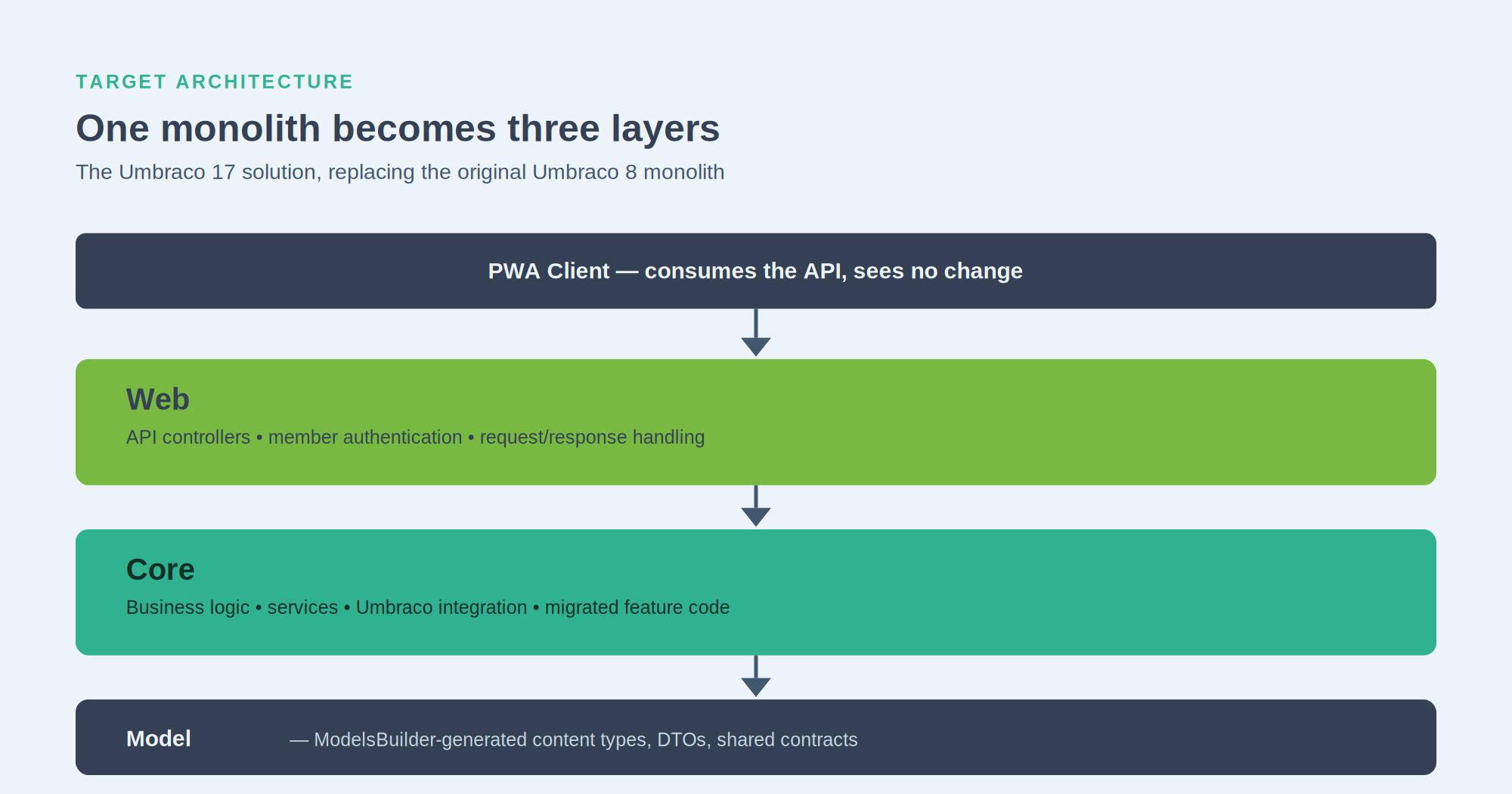
We knew from the outset that a single well-crafted prompt - “migrate the 8 codebase to 17” - would not work. Three transformations were happening at once: breaking the monolith into layers, moving from .NET Framework to .NET Core, and absorbing years of Umbraco's own evolution, where services were removed, reshaped or replaced entirely.
The real risk was not incorrect code. It was that the AI would re-decide the same architectural questions from scratch on every task, and not identically. Where do controllers live? How is logic split across layers? Different answers per task produce a codebase nobody can reason about.
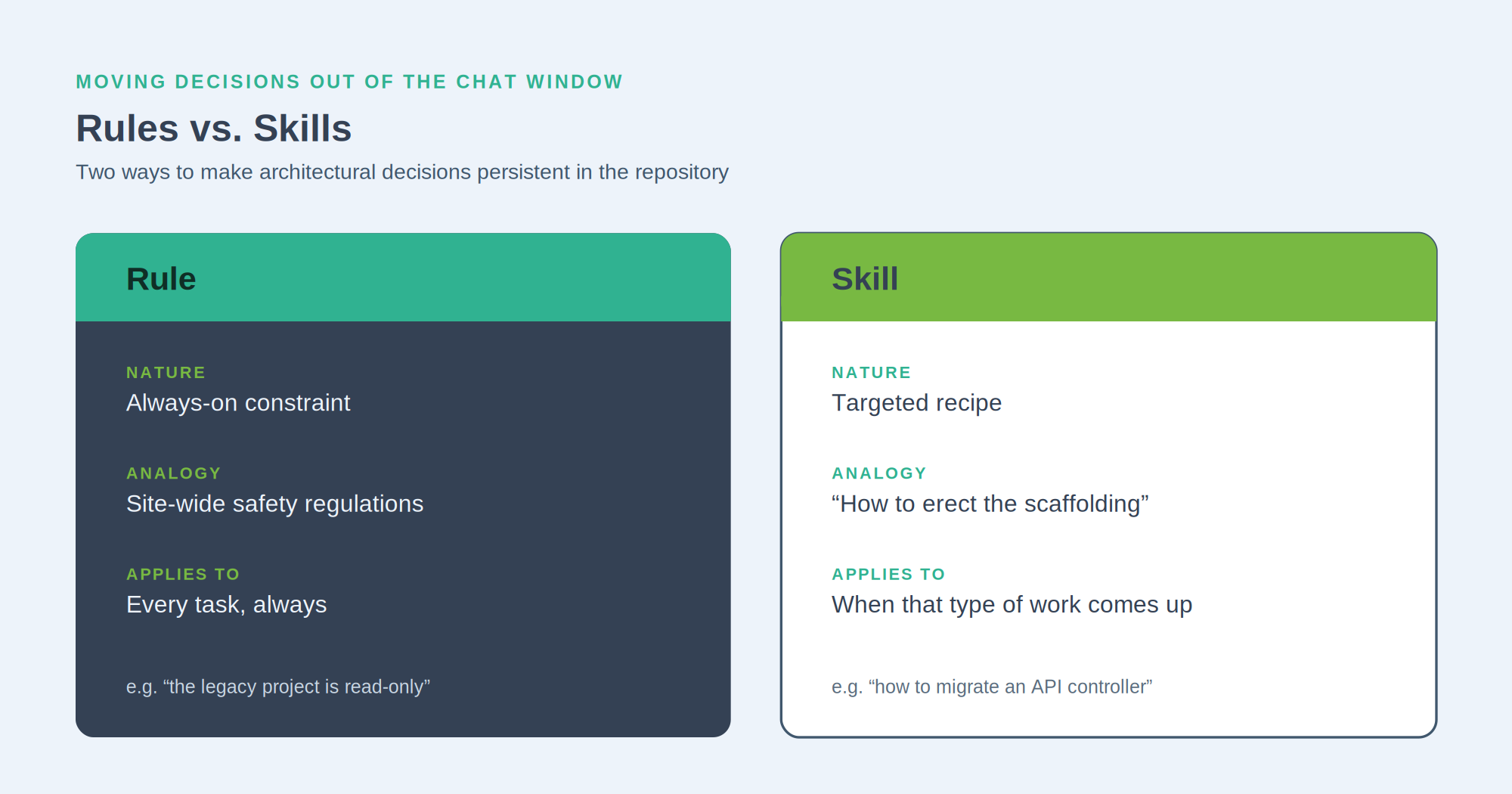
These are relatively new concepts with no settled definitions. Here is how we separated them:
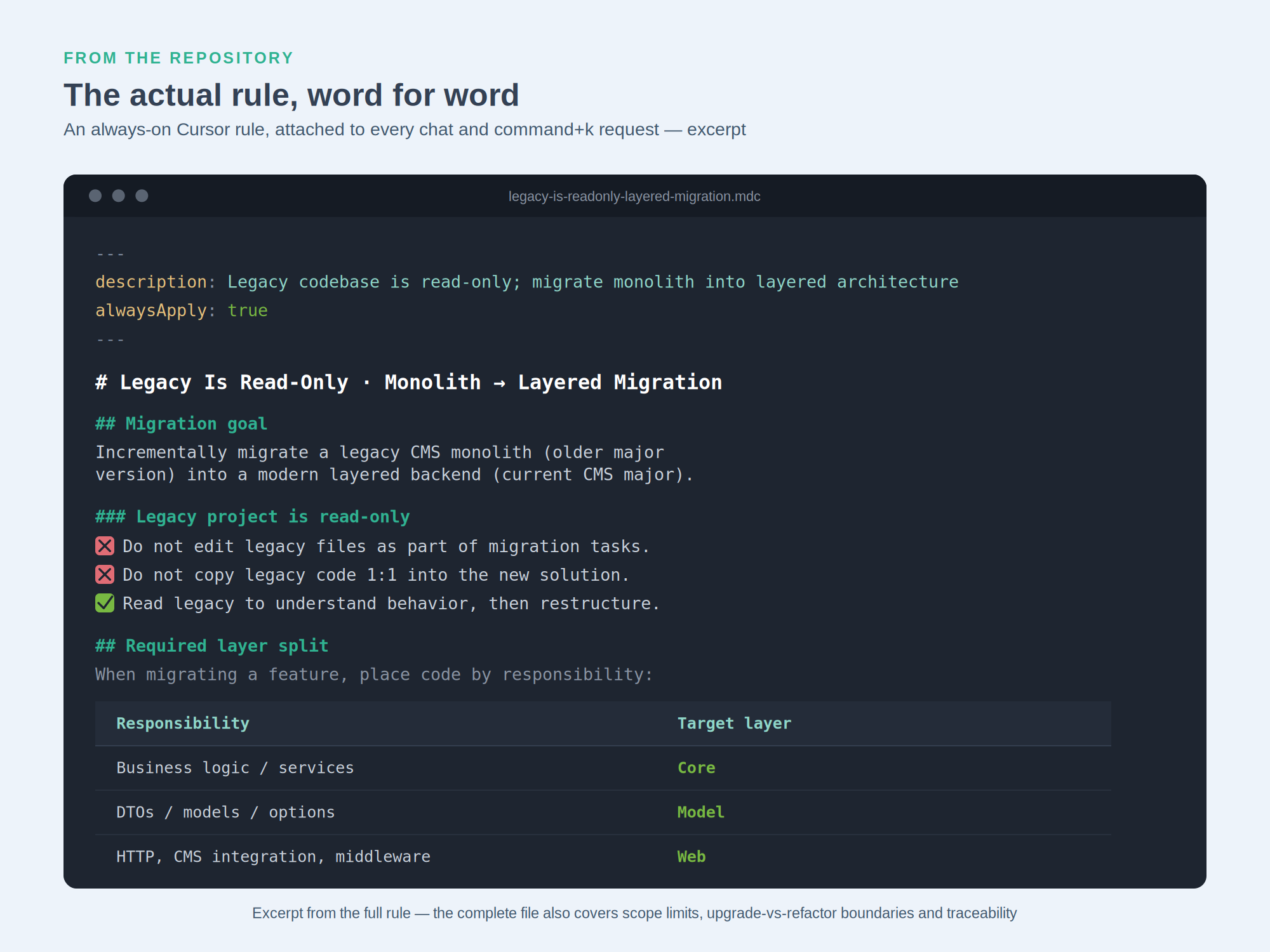
• Project structure. Legacy and new codebases live under a shared parent folder so the AI can read both. The rule explains that this is an Umbraco 8→17 upgrade: source on one side, target on the other.
• The legacy project is untouchable. The old code is a read-only reference and must never be modified. This keeps the source stable and always available as a comparison baseline.
• Monolith to layered architecture. The role of the web, core and model projects, when code must be split, and how responsibilities distribute across the three layers.
• Company conventions. Our internal .NET and C# development and coding standards, so generated code matches the in-house standard.
• Umbraco-specific constraints. ModelsBuilder-generated classes are read-only and are extended only through partial classes, never by editing generated code. Hardcoded property aliases found in the legacy code must be replaced with the generated alias properties.
• Configuration. Replace web.config with appsettings.json using the options pattern, following a defined structure that keeps each feature's settings separated and readable.
• API controller migration. Because the system uses custom member authentication, most endpoints must verify that an authenticated member is authorized for the operation. The skill specifies exactly how that check is implemented.
We started with a very small service as a test. The AI handled it flawlessly and respected the rules. Encouraged, we gave it something substantially larger. That is where the real lessons appeared.
It was too creative. On larger tasks it began refactoring to its own taste. Some ideas were good - but it became hard to tell which parts of the output corresponded to which parts of the legacy code. Traceability was lost.
It migrated too much. Given a larger feature, it would pull in the entire dependency tree. A service used by several features was moved and restructured in full, when only a few of its methods were needed. Worse, because it ignored that the service also depended on code not yet migrated, it produced interfaces that would not have been compatible with the intended end state.
• Selective migration. When migrating a feature, only the parts of a service that genuinely belong to that feature are carried over. Remaining methods may appear on the interface, but empty, with a clearly visible “not yet implemented” exception in the implementation. Structure is preserved; half the system is not dragged along.
• Preserve the original code structure. Fixing long-standing code smells mid-migration was tempting but out of scope. Simultaneous refactoring would have made the process far harder to follow and required much deeper review.
• Legacy source annotation. Every migrated element - class, service, even individual method - carries a comment identifying its origin in the legacy codebase. This turned out to be one of the highest-value rules: the migration stayed traceable at method level, which made review and testing dramatically easier, for the AI as well as for us.
.png)
• Human in the loop. We did not want the AI fully constrained. If it considers a deviation or refactor strongly justified, it must not decide silently - it asks. We approve or specify adjustments. Flexibility retained, control kept with the developer.
• Async all the way. Many Umbraco services became asynchronous in 17. The AI would often call the async method and then block on the result immediately - architecturally wrong. A skill now requires asynchrony to be carried through consistently, from the service layer up to the controller.
We also documented the cases where old and new Umbraco services diverge sharply: if this service appears in the legacy code, use this replacement in 17, in this way.
• Consistency. Multiple developers, across multiple sessions, producing the same architecture and the same conventions.
• Traceability. Every migrated component traceable to its legacy origin at method level.
• Controlled scope. Only what the current feature actually required - no incidental ballast.
• Explicit decisions. Ambiguity resolved by a developer, not silently by the AI. The direct result was significantly fewer rejected reviews.
Minimal refactoring was the principle, but a few changes were natural consequences of the upgrade and worth making.
Scheduled background jobs moved to Hangfire. The Umbraco 8 implementation was awkward to configure and hard to diagnose on failure. Hangfire made execution schedules transparent, and the Umbraco Hangfire package adds a backoffice dashboard where job status is visible and manual runs can be triggered - previously only possible through API-key-protected endpoints.
Incremental index updates. The legacy custom search indexes rebuilt entirely whenever any single content item changed, with predictable consequences. This could have been done correctly under Umbraco 8, but at the time there was neither the capacity nor the experience. We moved to incremental updates - refreshing only the affected index entries - mirroring how Umbraco handles its own indexes.
Backoffice extensions rewritten. The custom Angular-based backoffice extensions built for Umbraco 8 had to be reimplemented in the new backoffice. We used Umbraco's own backoffice extension skills as the basis. The surprise: it was fast, and it required no Angular knowledge. Backoffice development in 17 is meaningfully cheaper than it used to be.
AI-generated unit tests. A rule required unit tests alongside every piece of development. When later work touched previously migrated code, the tests caught regressions immediately - the classic case of a new feature quietly breaking an old one.
A Postman collection kept in sync. Another rule required the AI to add structured test calls to a Postman collection for every completed API controller. The real value was parallel testability: by switching environments, the same calls exercised both the Umbraco 8 and the Umbraco 17 endpoints. Comparing responses directly gave us the strongest available guarantee that the primary project goal held - that from the PWA's perspective, the upgrade was genuinely undetectable.
If you are planning an AI-assisted legacy migration, the transferable lessons are these:
1. Let the platform migrate its own data. Stepping-stone installations are cheaper and safer than custom conversion tooling wherever the content structure allows it.
2. Sequence by dependency graph, leaves first, prioritizing what unblocks testing earliest.
3. Treat the legacy codebase as read-only. A stable reference is worth more than the convenience of editing it.
4. Put architectural decisions in the repository, not in prompts. Rules for what is always true; skills for how recurring work is done.
5. Constrain scope explicitly. AI will migrate more than you asked for unless told otherwise.
6. Require provenance comments. Method-level traceability is what makes review of AI-generated migration tractable.
7. Make the AI ask. Silent architectural decisions are the expensive ones.
8. Build the comparison harness early. Dual-environment API testing is what converts “we think it's compatible” into evidence.
The headline lesson is simple, and it generalizes well beyond Umbraco: on a migration project, AI output quality is a function of how much of your architecture is written down. Prompts are transient. Repositories are not.
Not always. It is required when the content structure uses field types that no longer exist in later versions and must be converted without data loss. Where the structure does not require it, chaining empty intermediate solutions (10, then 13) and letting Umbraco run its own database upgrade is simpler and lower-risk.
Yes. The intermediate solutions exist only to advance the database schema. The application code can be migrated directly from 8 to 17.
For faithful translation of existing, well-bounded logic, yes - provided scope, architecture and conventions are constrained in the repository. Left unconstrained, it refactors unpredictably and over-migrates dependencies.
Provenance annotation is the key mechanism. When every migrated class and method records its legacy origin, review becomes a comparison exercise rather than an act of reconstruction. Unit tests and dual-environment API testing cover the rest.
Yes, but the cost is lower than expected. The new backoffice extension model no longer requires Angular expertise, and Umbraco's own extension skills make the rewrite quick.
ALLWIN Solutions has been building and modernizing custom .NET and Umbraco platforms for 18 years, as a Microsoft Gold, Umbraco Gold and Sitecore Silver partner. If you are weighing a legacy upgrade - and wondering how much of it AI can safely take on - we're happy to walk you through our approach.
.jpeg)

